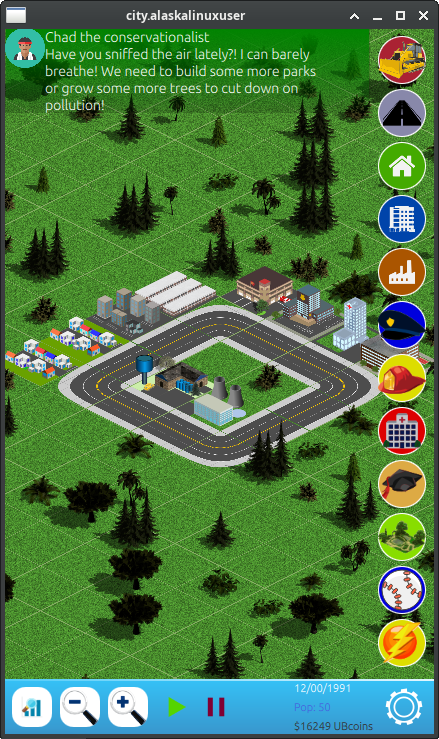
So much has happened on CitySim development, that I hardly know where to start with this post! I've not only found myself with some spare time to work on the game, but also the blessing of good progress. That good progress is not because of any skill on my part, but rather a clearer picture in my mind of how the game user interface should work, in particular with assistants.
I really wanted the game to help the user with advice on what to do next. Things like pointing out congested traffic, warnings for fires blazing across the countryside, notifications when there is a high demand for more residential areas, tips for keeping down pollution or bolstering education. I had originally thought of using popups, but this seems like a quick way to make the game annoying. If you recall, my theme for the game is "relaxing". The last thing I want is a popup every 10 seconds telling you to do something.
And yet, there needs to be some way that the game tells you what is happening. I think I found a good, balanced way to do that through two useful tools: statistics, and assistants.
The first thing I worked on was city statistics. Much like you would find in other city simulation games, you need some sort of chart or graph that you can look at to know how things are going, and that give you context clues of what to do. Now the game features a hidden stats bar at the top of the screen, which when revealed will show you various bar graphs which will aid you in city development.
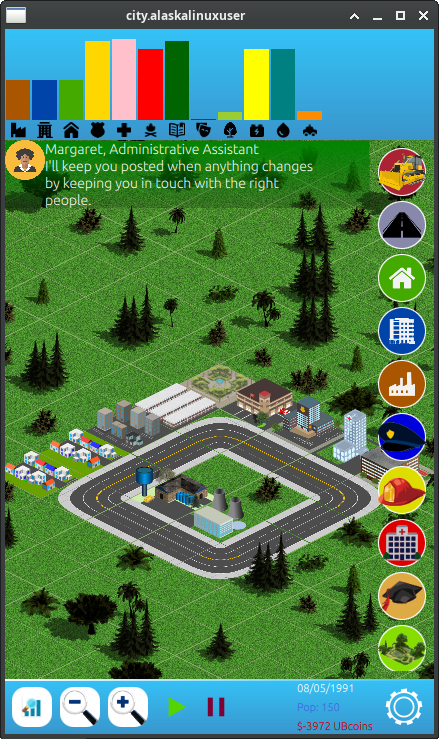
Rather than have labels, I went with icon symbols that I think are universally understood. A badge for police/crime, a tree for pollution/fresh air, a fire for fire departments, etc. These work well because text labels can take up a lot of space, and the icons don't need translation when used in other languages. Granted, without some sort of explanation, it may take a few tries of the game to figure out each bar graph in relation to high or low being good or bad, but as it stands, it is rather useful if you want it. If you don't, well, you can just hide it with the graph button, and never worry about it again!
Second, I developed the assistants. The original author had already made a sort of notification bar at the top of the screen which if enabled (it was disabled in his repo) would tell you some piece of information. I changed it graphically, making it transparent, and expanded it to include an icon of each assistant, such as the mayor, the fireman, the doctor, etc., and their title as well as a text block of what they want you to know. Just like the statistics, this information bar can be hidden away by tapping on it.
If you do use the assistants, they don't seem to be a nuisance, as they don't popup, flash, move, or make any noise. They certainly are not AI, either. Essentially, part of the logic used for the statistics and upgrade/populate calculations is also used to drive the assistants, pulling up the appropriate person when any metric is met, giving a canned response. For example, the in game logic prevents commercial zones and industrial zones from upgrading past a certain level unless your education score is high enough and that score is based on population and school numbers. When the game builds the statistic bars it also detects that score being too low to upgrade your zones, and it will trigger the appropriate assistant to tell you that you should build more schools. Thus the assistants notification bar changes to the teacher.png icon, and the title and text of that bar change accordingly.
By default, if you have no other call for assistants to tell you something, then the assistants bar will display Margaret, the administrative assistant, who tells you things like: "I'll keep you posted when anything changes by keeping you in touch with the right people." Or ""Hello Mayor! I am your new administrative assistant. Let's build a city!"
There were lots of other small updates as well, as I strive to refine the game a bit, but this was the big change since my last post. Don't forget that you can check out all these commits on Gitlab, too! [1]
Linux - keep it simple.